
You've probably got the same problem a lot of iPad owners run into. The tablet looks plain, you want it to feel more like yours, and the first instinct is to grab the cheapest decal you can find. That's usually where the trouble starts, because a sticker for iPad has to do more than look good, it has to live with your case, your keyboard, and the way you use the device every day.
The iPad is not a disposable gadget. Apple's shipment history shows a huge installed base and continued volume, with about 74.2 million iPads sold in 2013, around 49.5 million in 2023, an estimated 51.4 million in 2024, and 60.2 million in 2025 globally, according to the sales history cited by Statista (Apple iPad unit sales history). That kind of scale matters, because it keeps demand alive for decorative, protective, and personalized accessories. The broader sticker category is large too, with market estimates placing it at $4.61 billion in 2024 and projecting $7.67 billion by 2033 at 5.81% CAGR, while another estimate values it at $4.88 billion in 2025 and forecasts $8.11 billion by 2034 (sticker market statistics).
The mistake is treating all decals like they're interchangeable. They're not. A good iPad decal should protect the finish, stay clear of case pressure, and come off cleanly when you're ready to trade in or sell the device.
Why Your iPad Deserves Better Than a Generic Sticker
A customer usually notices this problem after the fact, not before. They buy a cute decal, slap it on the back of the iPad, drop the tablet into a folio case, and a few weeks later the corners start to curl or the adhesive leaves a dull patch when it's removed. That's not a design problem, it's a planning problem.
The premium device rule
Apple's tablet line has stayed commercially important for years, and the installed base keeps renewing itself with new shipments and upgrades. That means an iPad often stays in service long enough for adhesive choices to matter, especially if you care about resale value or trade-in condition. A cheap sticker may look fine on day one, but it can become the part that makes your premium device feel tired.
Practical rule: if a decal would make you hesitate before peeling it off six months later, it's the wrong decal.
The right move is to think like a device owner, not a craft shopper. You want something that looks intentional, sits flat, and respects the hardware underneath. For simple personalization, a minimal monogram or name decal is often smarter than a loud all-over graphic, and a lot of buyers start with a compact custom option like monogram initials vinyl decal stickers.
What generic stickers ignore
Most bargain stickers are built for short-term novelty, not long-term use. They can be too thick, too aggressively adhesive, or cut without regard to rounded corners and camera geometry. On a tablet that spends its life on desks, in backpacks, and under accessories, those flaws show up fast.
The other issue is visual clutter. If your iPad already lives inside a case or keyboard setup, a giant graphic on the back rarely delivers the payoff buyers expect. A subtle decal tends to age better because it works with the device instead of fighting the way you use it.
Understanding the Three Main Types of iPad Stickers
The cleanest way to choose is to separate the options by function, not by marketing language. Vinyl decals are the simplest, full-coverage skins are the most visual, and protective overlays are the most practical if your priority is surface protection over decoration.
Vinyl decals
Vinyl decals are the best choice for most daily users. They cover a defined area, usually the back of the tablet, and they let the device's original finish stay visible around the artwork. That makes them a strong fit for people who want personality without turning the whole iPad into a wrap project.
They're also the easiest to live with under a case, because they don't add much bulk. If you want a low-profile look, this is the category I'd recommend first.
Full-coverage skins
Skins are for buyers who want the iPad to feel transformed. They cover more surface area, so the result looks more deliberate and more dramatic. The trade-off is obvious, they're less forgiving, they require better alignment, and they're more likely to create issues if your case presses hard against the edges.
Use a full skin only if you're comfortable with a more exacting install and you want the entire device to read as customized. If you switch cases often, a full wrap is usually overkill.
Protective overlays
Overlays are the most functional option. They're less about decoration and more about giving the surface an extra layer. That's useful if you handle the tablet constantly or want an added buffer against everyday wear.
The downside is simple, they don't satisfy people who want the device to look personalized. If style is the main goal, overlays feel too utilitarian.
Best fit by user
- Students: choose a small vinyl decal, because it's easy to remove and doesn't interfere with everyday carry.
- Professionals: choose a restrained skin or a minimal decal, because polish matters more than flash.
- Heavy accessory users: choose a low-profile decal, because bulk becomes the enemy.
If you're still unsure, use a sizing-and-style reference like custom car decals and made-to-order sticker options as a reminder that clean fit beats oversized art every time. The same logic applies to tablets.
How to Choose the Right Size, Material, and Finish
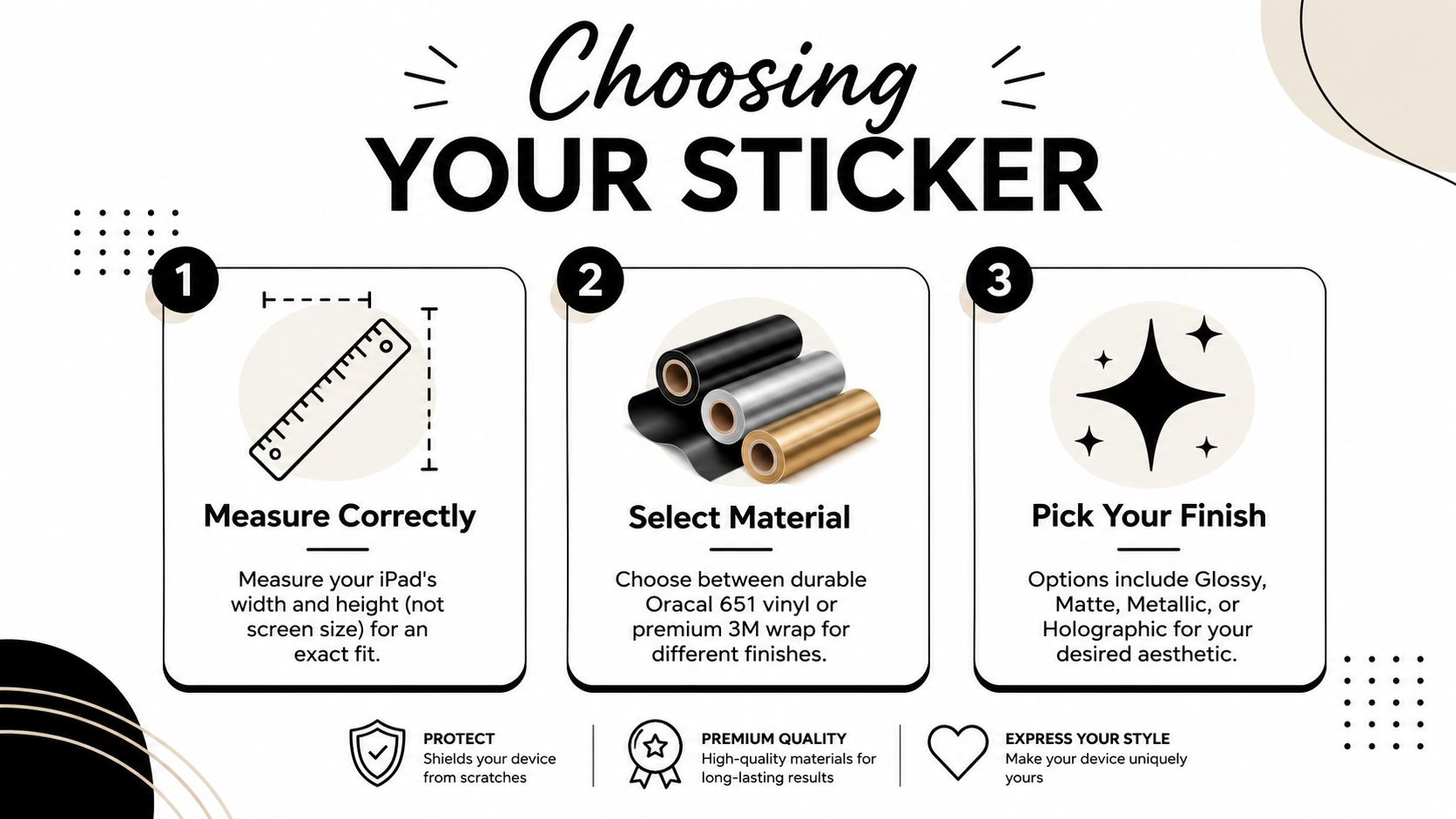
Start with the back of the iPad, not the screen. Apple's design specs show why, the body shape, camera placement, and rounded corners all limit where a sticker for iPad can sit cleanly, even before you factor in the case or any accessories (Apple support dimensions and design details). If you size the decal from the display, you end up with a piece that looks wrong on the actual device.
Measure the body, not the screen
Measure the back surface you want to cover, then leave room for edges and cutouts. That gives you a sticker that sits where it should instead of crowding the corners or interfering with the camera area. A full-back graphic that ignores the physical footprint of the tablet usually looks careless.
Tablet skin sizing charts from decal sellers and makers follow the same logic, because iPad models vary enough that one universal size is a bad fit. A useful reference is a custom car decals and made-to-order sticker options page, since the same rule applies here, clean fit beats oversized art every time.
Pick the right vinyl thickness
A vinyl specification for sticker material lists PVC thickness at 75 to 90 microns and temperature resistance from -50 °C to 90 °C (vinyl material specification). That tells you the film is thin enough to lie flat, but still stable enough for normal daily use.
Use thin, steady vinyl on a tablet. Heavier material tends to show edges sooner, trap air more easily, and fight the gentle curves around the body. If the adhesive grabs too hard, removal becomes a pain later, and that matters if you care about resale value.
Finish matters more than people think
Gloss gives you more pop. Matte hides fingerprints better. Metallic and holographic finishes draw the eye, but they also make every alignment mistake harder to miss. For a device you use every day, I'd choose matte or smooth gloss before I'd choose anything flashy.
Keep the finish practical. If you touch the tablet often, avoid surfaces that make smudges, edge lines, and dust obvious. A good finish should sit on the device and still look intentional.
Simple buying rule: choose the smallest surface coverage that still gives you the look you want. Bigger only helps if it stays flat, stays clean, and comes off without leaving a mess.
The Case Compatibility Problem Most Guides Ignore
Most iPad stickers are judged as if the tablet lived naked on a desk all day. That's not reality. The iPad usually spends its life inside a folio, near a keyboard, or magnetically attached to some accessory, and those conditions change what works.
Case pressure changes the equation
A thick or oversized decal can lift at the corners when a folio case presses against it. That's especially true if the sticker runs too close to the edges. Once lift starts, dust gets under the film and the adhesive gets weaker.
A low-profile decal avoids most of that. It sits flatter, creates less friction, and is less likely to fight the case every time you open or close the device.
Keyboard and magnetic accessories
If you use a keyboard attachment or any magnetic accessory, subtle placement matters more than bold design. You don't want the sticker fighting the connection area or creating a bump where the accessory needs a clean seat. The safest strategy is to keep decoration away from any zone that needs consistent contact.
The same logic applies to users who carry the tablet in and out of stands or docks. A full skin can be over-engineered for that kind of routine, while a compact decal stays invisible in practice and still gives you personality.
What actually works best
- Slim vinyl decals: best for folio cases and everyday carry.
- Full skins: best only if you rarely use a tight case.
- Bold edge-to-edge graphics: best for display pieces, not daily-use tablets.
If your iPad stays cased most of the time, subtle wins. A sticker that disappears under a case is wasted money. A sticker that survives the case is the one worth buying.
Step-by-Step Application and Removal Without the Headache
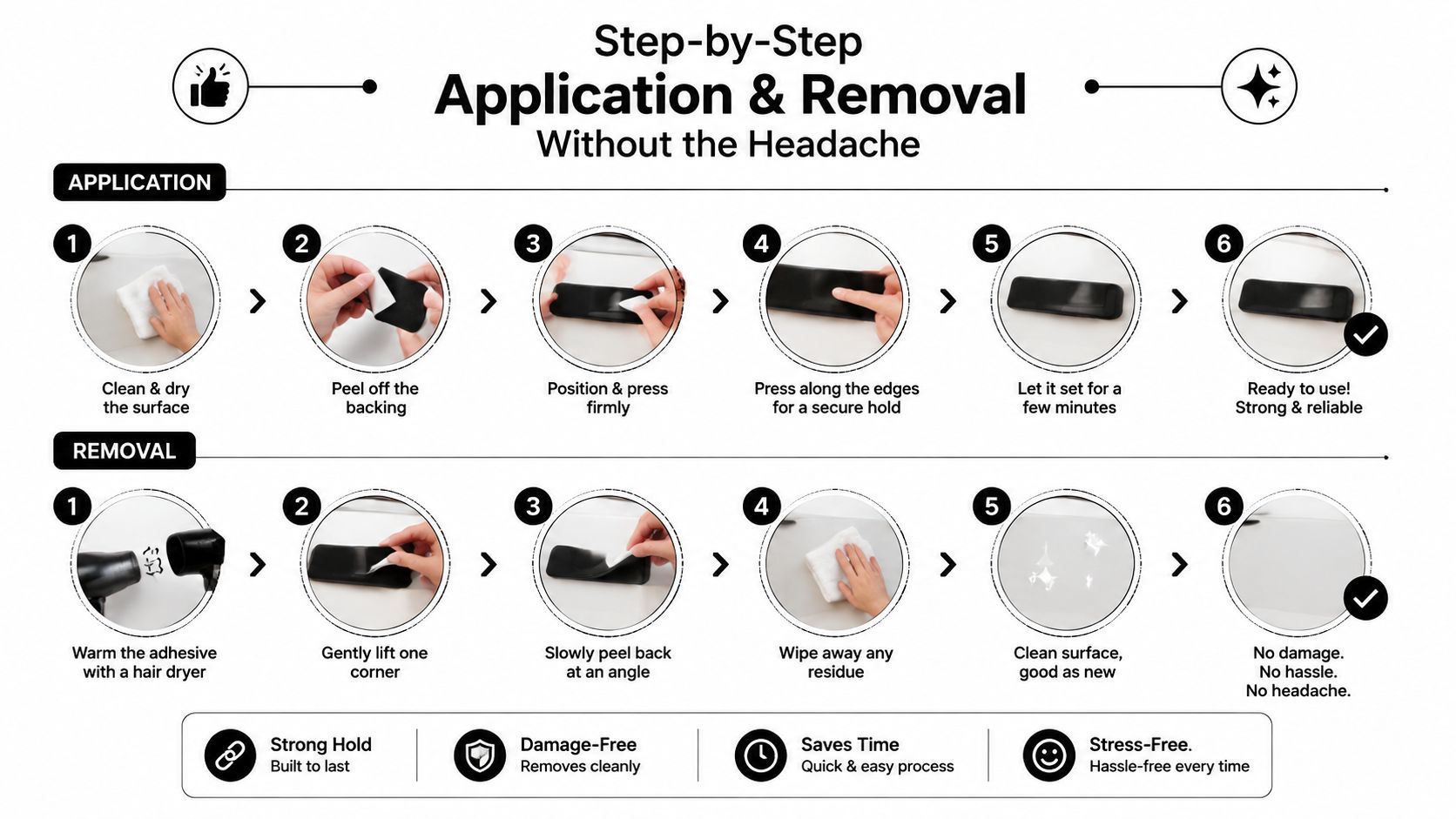
Clean application is mostly about patience and surface prep. The back of the iPad should be free of dust, skin oils, and lint before anything touches it. If you rush this part, you'll spend twice as long trying to fix bubbles and alignment drift.
Apply it the right way
Start by positioning the decal without fully committing to it. Check the edges, the camera clearance, and how it will sit once the case goes back on. If it looks even slightly off before contact, it'll look worse after contact.
Once the placement is right, press from the center outward. That pushes air toward the edges instead of trapping it underneath. Use firm, steady pressure, not frantic rubbing.
Fixing bubbles and edge lift
Small bubbles are usually a placement issue, not a material failure. Work them out slowly rather than lifting and re-sticking the whole decal. If an edge keeps lifting, the sticker is probably too close to a curve or being compressed by the case.
Practical rule: if you have to force a decal to sit flat, the size or placement is wrong.
Removal without damage
When you're ready to remove the sticker, peel slowly and keep the pull angle low. That reduces the chance of stressing the finish. If any adhesive remains, work it off gently instead of scraping at the surface.
The point of a good iPad decal is reversibility. You should be able to change your mind without feeling like you've committed to permanent decoration.
Durability, Residue, and Protecting Your iPad's Resale Value
An iPad can stay in a household or office for years, so the sticker has to age well. Cheap adhesive tends to be the first thing that fails, especially when heat and repeated handling start to break it down. Once that happens, residue becomes the bigger problem than the design itself.
Why residue is the real risk
Residue is annoying because it changes the feel of the device even after the sticker is gone. On a premium tablet, that matters. Buyers who plan to resell or trade in later should care less about style trends and more about clean removability.
That's also why tablet users should think more like finish-preservation buyers than hobby crafters. A decal should protect the resale path, not complicate it. If you want a broader look at keeping the display side in good shape too, the screen protector guide is a useful companion resource because it approaches tablet protection from the surface-preservation angle.
Adhesive safety over time
Vinyl quality and adhesive stability matter together. A stable film is less likely to shrink, and a sane adhesive is less likely to leave a gummy trail when removed. On anodized aluminum, that combination matters even more because you want the finish to remain clean and uniform.
Heat is the enemy of bargain decals. If the adhesive softens, the edges start moving, and once movement starts, dust and grime get involved. That's when the decal stops looking intentional.
Warning signs to watch
- Corner curl: usually means the decal is under stress from the case or cut too close to an edge.
- Sticky residue: usually means the adhesive wasn't meant for longer wear.
- Surface haze after removal: usually means the film or glue was too aggressive for the finish.
If resale value matters to you, pick the safest sticker you can, not the flashiest one. The best decal is the one that disappears cleanly when you're done with it.
Why American-Made Vinyl from Custom Sticker Shop Stands Out
A lot of iPad decals are sold like novelty items. That's the wrong category if you care about fit, finish, and removal later. Quality vinyl behaves differently, and domestic production usually gives you more consistent results because the material, cutting, and transfer process are controlled more tightly.

What actually matters in a quality vinyl source
Custom work should start with consistent material and clean transfer. Pre-spaced transfer tape helps the decal go down without wrinkling, which matters on smaller tablet surfaces where every millimeter shows. A reputable maker also gives you a better shot at predictable adhesion and cleaner removal later.
American-made Oracal vinyl is a strong fit for that reason, because it's built for durability rather than novelty. If you want to commission something more personal, a custom design option is the right route, because your tablet deserves sizing and layout that match the exact device you own.
Why buyers should care
This isn't only about style. It's about confidence that the sticker will sit flat, stay put, and come off without drama when you change cases or sell the device. That's the difference between a purchase that feels clever on arrival and one that still feels smart months later.
For creators or anyone brainstorming custom art before ordering, a tool like LunaBloom AI for creators can help organize visual ideas before they're turned into a decal. The important part is still the material and the fit, but good planning makes the final result cleaner.
My recommendation
If you're buying a sticker for iPad because you want a long-term accessory, don't chase the biggest graphic. Choose the maker that treats fit, vinyl quality, and removability as essential. That's how you get a decal that looks custom without turning into a maintenance problem.
Common Questions About iPad Stickers Answered
Will a sticker void my iPad warranty? No, a decal by itself usually does not void a warranty. The risk is damage from poor removal, aggressive adhesive, or residue that gets worked into the finish. If you keep the adhesive on the outside surface and remove it cleanly, the sticker is the accessory, not the problem.
Can I use an iPad sticker with a case or cover? Yes, if you choose the right profile. Low-profile decals are the safer pick because they sit flatter and are less likely to catch on a case edge. Thick vinyl, layered graphics, and bulky full skins create more friction, which is exactly what causes peeling at the corners. If your case wraps tightly around the back, pick a design that stays well clear of seams, ports, and cutouts.
Will it interfere with MagSafe or magnetic accessories? It can, depending on placement and thickness. A thin decal on a flat back usually causes fewer issues than a layered skin or a sticker placed too close to magnetic alignment points. Keep the design away from areas you rely on for charging or attachment, and do not stack sticker material over spots that already need a clean contact surface. That keeps the tablet looking personal without making your accessories fight the finish.
How do I clean around a decal without lifting it? Use a soft cloth, light pressure, and a small amount of cleaner on the cloth instead of directly on the edge. Work across the surface, then wipe away from the decal edge so liquid does not creep underneath. Stop rubbing at any corner that starts to lift. If the edge is already stressed, remove the sticker and replace it before the peel spreads.
What happens in hot or cold weather? Adhesive behavior changes with temperature. Heat can soften the bond and make corners more likely to lift, while cold can make the material feel stiffer and less willing to settle down. Store and apply the decal in a steady indoor environment, then avoid forcing it into place when the tablet or room feels too cold. That gives the adhesive a better chance to stay flat over time.
Can I remove a sticker from a used iPad safely? Yes, but go slowly. Warm the surface slightly, lift one corner, and peel back low and steady so the adhesive releases instead of tearing. If the previous owner used a strong adhesive or left residue behind, clean the area gently before putting on anything new. For a used device, a clean removal matters as much as the new design, because leftover residue can telegraph through a fresh decal and make the tablet look neglected.
What kind of design works best for daily use? Smaller, cleaner graphics usually beat full coverage skins. A low-profile decal gives you a personal look without turning the tablet into a maintenance project, and it is easier to live with if you swap cases often. For school, business, or resale-minded buyers, keep the design readable, restrained, and easy to reproduce if you want another copy later.
If you want a sticker for iPad that looks clean, sits flat, and comes off without wrecking the finish, Custom Sticker Shop is built around that kind of practical result. Visit Custom Sticker Shop to explore custom decals that fit your device, your case, and the way you use your tablet every day.